Microsoft Agent Cost Management
How are agents licensed and how to calculate the cost?
- Agents
- Copilot
- Microsoft 365
- Licensing
Microsoft Agent Cost Management
If your organization is starting to deploy AI agents, you’ve likely realized that the billing mechanism is quit complex and therefore a challenge to predict your cost. On top of that microsoft has multiple billing models to choose from. Whether you are using Microsoft Copilot Studio, Azure AI Foundry, or Teams Toolkit, understanding the lifecycle of cost management is the only way to scale without breaking the bank.
1. The technology
An agent is an intelligent software entity designed to act on your behalf to complete specific tasks, automate workflows, and interact with data.
How Agents Differ from Basic AI
Think of a standard AI as a "researcher" and an agent as a "special assistant."
Standard AI: You ask a question; it provides an answer based on its training data.
AI Agent: You give it a goal (e.g., "Onboard this new employee"); it identifies the steps, connects to your systems (like HR software or Email), and executes the tasks until the goal is met.
A simple example of the power of AI. You have a smart home system when you come home the lights go on by a simple ruling If A, then B happens. An AI agents knows more context. When you come home from the gym it sets the light bright, but when you come home from a long workday it dims the lights to help you relax.
The Difference: Automation does the task. An Agent understands the mood.
How can agents be built:
Copilot Studio Agent Builder: Use Copilot Studio Agent Builder tool directly within Microsoft 365 Copilot Chat in Teams to autonomously handle tasks, answer questions, and interact with enterprise data to support users in real time.
Copilot Studio: Use triggers, advanced logic, and connections to other Microsoft services or third-party platforms to create agents with full Copilot Studio.
Pro Developer Tools: Use tools and services like Teams Toolkit, Copilot Studio native integration with Visual Studio, and Azure AI Foundry to build fully customized agents with the model and orchestration engine of your choice.
2. Agent Cost Management
Cost management comes in stages.
1. Estimate your cost
2. Setup the billing model
3. Tracking and Forecasting
4. Manage the agent costs
Estimate your Cost
You shouldn't wait for the first invoice to understand your costs. Estimation should happen during the planning phase of any custom agent.
Why Estimation Matters
· Building the Business Case: Helps justify the ROI of AI to finance teams.
· Model Selection: Determines if you’ll save more with a Prepaid Pack or a PAYG meter.
· Governance: Informs where you need to set "guardrails" or message limits.
3. Choosing Your Billing Model
Before choosing your billing model. You should know what the licensing rules are and what features and functions you already own before choosing an Agent Billing model.
When you are already using Microsoft 365 Copilot for you employees from a productivity perspective you also receive rights to use agents, with his limitations. It covers for example agents built on top of Copilot chat and Sharepoint. Similar to Dynamics which some features are already part of your Dynamics licenses.
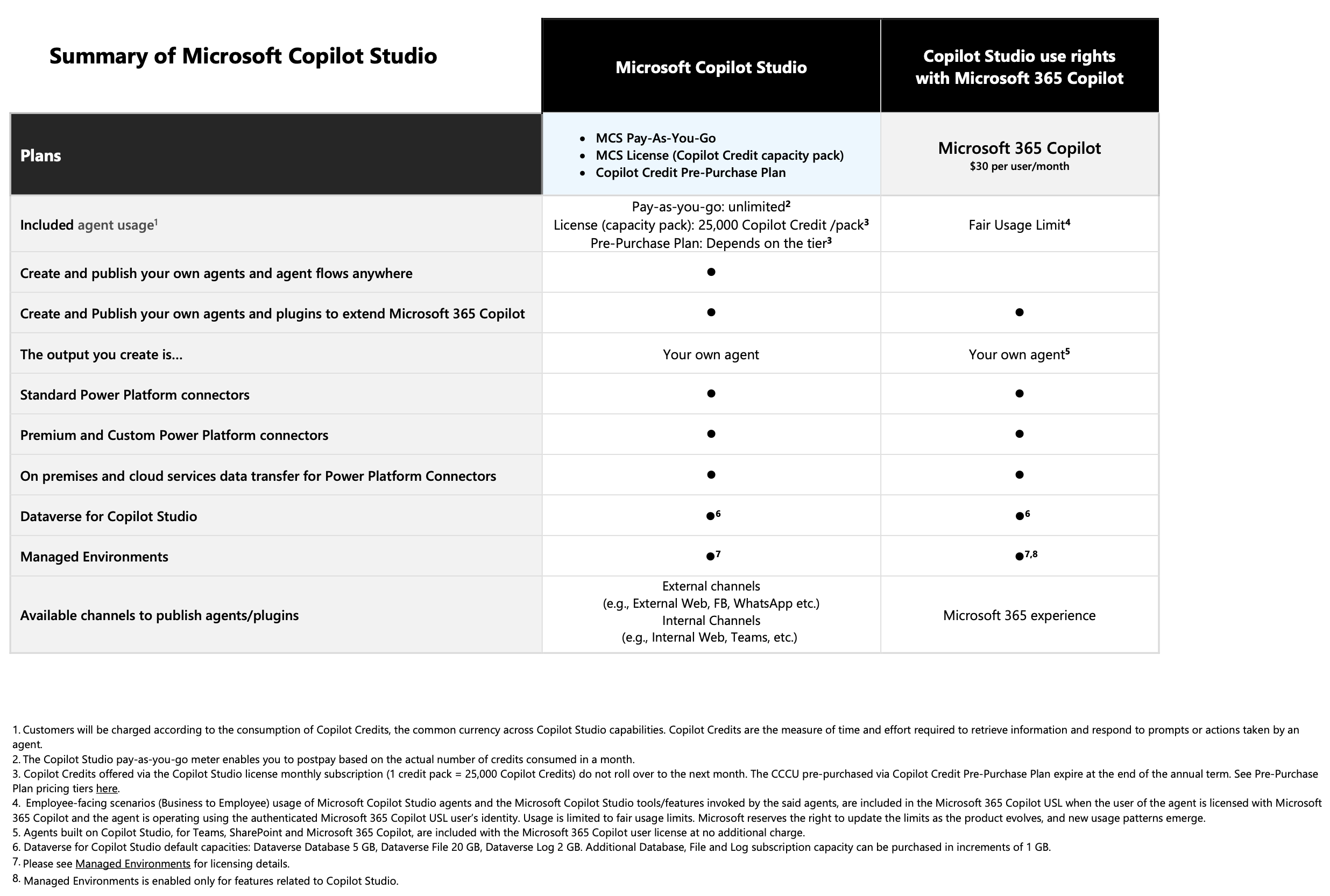
The licensing model.
When users interact with Copilot Studio agents or when agents perform tasks on behalf of users, they consume Copilot Credits. Copilot Credits are a measure of the time and effort required for an agent to retrieve information, respond to prompts, and perform tasks through actions, including executing workflows and invoking AI Tools and custom skills that extend the agent’s capabilities.
This is where the difficulty to predict and forecast comes into play. Credits are calculated by the input and output of the agent. It’s also differs based on the features of the agents. When you limited the agent to a classic answers it’s 1 credit, are you allowing the agents to give generative answers you pay 2 credits per response.
The sum is as follows: Total cost = ((#answers feature rate for the operation) + (#answers text and generative AI tools (premium) for the reasoning model's token usage) * #of interactions.
Example
You have a customer support agent on your website that answers questions based on customer return policies and product manuals that you provided to the agent as a knowledge source.
An average run includes four classic answers for return-related questions and two generative answers for troubleshooting questions. The average is 900 customers per day. The estimated cost per day is based on the following calculation: [(4x1)+(2x2)] x 900 customers = 7200 Copilot Credits.
The billing models.
Now that we know how to calculate. We can define the best licensing model for your purpose. Make the credit calculation for your scenario’s to be able to determine the unlimited option with Microsoft 365 Copilot bs the Message packs and Pre-Purchase plans.
Tool Tip: Microsoft provides the Copilot Studio Agent Consumption Estimator to help you project monthly message volumes and compare billing models.
| Model | Licensing Model | Cost Structure | Per Message Cost |
|---|---|---|---|
| Microsoft 365 Copilot | Per user (internal use) | $30/user/month | - |
| Pay-As-You-Go (PAYG) | Per message | $0.01 per message | $0.01 |
| Message Packs | Per message | $200 for 25k messages/month | $0.008 |
| Pre-Purchase Plan (P3) | Per message, specific workload | 5% to 20% discount | $0.0095 - $0.008 |
5. Tracking and Forecasting
Once your agents are live, you need to monitor them through the Microsoft 365 Admin Center (MAC), through the Copilot Control System (CCS), provides a growing set of tools for tracking, analyzing, and agent-related costs across Microsoft 365 Copilot Chat. These capabilities can help admins monitor usage patterns, identify high-cost agents or users, and manage consumption proactively.
In addition, admins can track and manage agents through the CCS Agents experience in MAC.
Coming Soon: The Message consumption report now available in Preview helps you manage metered consumption costs for Microsoft 365 Copilot Chat. This report gives you visibility into billed messages associated with your Microsoft 365 Copilot pay-as-you-go billing policies.
6. Active Cost Control: Best Practices
Managing costs is an ongoing process. Here is how to keep your budget on track:
1. Restrict Creator Access: Use Entra security groups (e.g., "Copilot Makers") so only authorized users can spin up agents.
2. Set Spending Limits: Configure "soft limits" (email alerts at 80% usage) and "hard limits" (service suspension at 100%) within your billing policies.
3. Handle Overages Proactively: If you use prepaid packs, ensure you have a "fallback to PAYG" configured so your critical customer service agents don't stop responding mid-month.
4. Review Quarterly: As new features like "multi-agent orchestration" or "code interpreter" roll out, consumption patterns will change. Adjust your estimates every three months.
Ready to take control of your AI spend?
Managing agent costs doesn't have to be a guessing game. By aligning your billing model with your usage patterns and utilizing the tracking tools, you can adopt innovation while maintaining strict financial accountability.
Are you customer ready for AI and Copilot. Use Softspend to assess the customers tenant to be eligible for Copilot, and if not what is needed to built the right governance.