Microsoft Agent Credits Explained: How the Flex Plan Can Reduce Costs Across Copilot, GitHub and Microsoft Foundry
Microsoft Agent Credits can be complex, especially when combining Copilot, GitHub and Microsoft Foundry. Learn when agent usage is included in Microsoft 365 Copilot, when additional credits are required, and how the Microsoft Flex Plan can help optimize AI costs across eligible services.
- Tokenomics
- Copilot
- Licensing
- Agent
- github
- foundry
Microsoft Agents
Microsoft is rapidly expanding the ways organizations can build and deploy AI agents.
You can build agents in Microsoft Copilot Studio, use different agent harnesses depending on the complexity of the task, build custom AI solutions with Microsoft Foundry, and use AI services from GitHub.
That flexibility creates enormous opportunities, but it also introduces a new question:
How do you pay for all of this?
Does your existing Microsoft 365 Copilot license cover your agent? When do Copilot Credits start to apply? How does consumption in Microsoft Foundry or GitHub fit into the picture? And can Microsoft's new Flex Plan help organizations combine eligible consumption and reduce their overall costs?
Let's break it down.
Start with the most important question: is your agent already covered by Microsoft 365 Copilot?
For many organizations, the first assumption is:
"We already pay for Microsoft 365 Copilot, so our agents are included."
Sometimes that's true. But not always.
For an agent using the Standard harness, Microsoft provides an important licensing benefit for Microsoft 365 Copilot users. If a user has a Microsoft 365 Copilot license and uses the agent with their authenticated identity in Copilot Chat, Microsoft Teams or SharePoint, classic answers, generative answers and Microsoft Graph tenant grounding aren't charged as additional Copilot Credits. Microsoft can still show these as non-billed credits in the consumption reports, but they aren't charged to the PAYG meter.
Microsoft's pricing page describes the principle even more simply: Copilot Studio included with Microsoft 365 Copilot allows licensed users to build and use internal agents within Microsoft 365 using the Standard harness at no additional cost.
So, conceptually:
Microsoft 365 Copilot user + Standard harness + agent used inside Microsoft 365 = potentially no additional agent consumption charge.
That is a very valuable entitlement.
But there are boundaries.
First: What is an agent harness?
When do we pay for agents / credits? Therefore we need to understand Microsoft’s harness model. Think of the harness as the runtime and orchestration layer around the AI model. It determines how an agent works with instructions, knowledge and tools, how it reasons through a request, and how it executes work.
This matters because the harness you choose doesn't just affect what your agent can do.
It can also change how your agent is billed.
For this cost discussion, two harnesses are particularly important.
Standard harness
The Standard harness is the established Microsoft Copilot Studio runtime. It supports capabilities such as topics, knowledge, tools and generative orchestration, giving organizations controlled ways to design business agents.
The important part from a licensing perspective is that eligible Standard-harness usage can be included with a Microsoft 365 Copilot user license. When a licensed user interacts with a Standard-harness agent, usage of that agent is covered by the existing per-user Microsoft 365 Copilot license.
In simple terms:
Microsoft 365 Copilot licensed user
↓
Standard harness
↓
Eligible agent usage inside Microsoft 365
↓
Covered by the per-user Copilot license
This is important because it means that saying"all agents require additional Copilot Credits" is not correct.
There is already an agent entitlement within Microsoft 365 Copilot for eligible scenarios.
Copilot harness
The Copilot harness is designed for more complex agentic work. It provides capabilities for multi-step reasoning, planning and longer-running tasks where the agent can work towards a goal rather than simply respond to an individual question.
The commercial difference is significant.
Usage of the Copilot harness is consumption-based and can consume Copilot Credits, including activities associated with building, testing, evaluating and running these agents.
So now the model becomes:
Microsoft 365 Copilot licensed user
↓
Copilot harness
↓
Advanced reasoning and agentic workloads
↓
Copilot Credits consumed
The harness is therefore also a commercial decision
The difference can be summarized like this:
Standard harness | GitHub Copilot harness | |
|---|---|---|
Typical approach | Controlled business agents | Advanced agentic workloads |
Orchestration | Topics, knowledge, tools and generative orchestration | Multi-step reasoning and planning |
Microsoft 365 Copilot entitlement | Eligible usage can be included | Doesn't eliminate consumption billing |
Additional Copilot Credits | Not for eligible included usage | Consumption-based |
The key takeaway is: Choosing an agent harness isn't only a technical architecture decision. It can also be a licensing and cost decision. This becomes increasingly important as organizations move from relatively straightforward internal agents toward more advanced reasoning and autonomous work.
When does a Standard harness agent start consuming Copilot Credits?
Microsoft publishes a useful breakdown of this.
Scenario | Covered by Microsoft 365 Copilot? | Additional Copilot Credits? |
|---|---|---|
Standard agent used by licensed user in Microsoft 365 | Yes | Generally no |
Standard agent used by user without Microsoft 365 Copilot | No | Yes |
Standard agent used outside Microsoft 365 | No | Yes |
Workflow executed inside Standard agent by licensed user | Yes | Generally no |
Prompt executed inside Standard agent by licensed user | Yes | Generally no |
Autonomous agent-flow execution | No | Yes |
Computer Use | No | Yes |
GitHub Copilot harness agent | No | Yes |
This is based directly on Microsoft's current administrator guidance. In particular, Microsoft says that Standard harness agents are covered in Microsoft 365 channels for users with a Microsoft 365 Copilot license, while GitHub Copilot harness agents use consumption-based billing for all activity, including creation and runtime activities.
Example 1: an internal HR agent
Imagine a company with 2,000 employees, of whom 800 have Microsoft 365 Copilot. You build a Standard harness HR agent that answers questions using internal HR documents. If one of those 800 licensed employees uses the agent inside Microsoft 365 with their authenticated identity, the supported Standard-harness interactions can fall within their Microsoft 365 Copilot entitlement.
If the same agent is made available to employees who don't have Microsoft 365 Copilot, the economics change. Their usage can consume Copilot Credits.
So the licensing decision is not simply:
"Does the company own Copilot?"
It is:
Who uses the agent, where do they use it, which harness does the agent run on, and what does the agent actually do?
Copilot Credits are Microsoft's consumption currency
Once you're outside the included Microsoft 365 Copilot scenario, Copilot Credits become important.
Microsoft describes Copilot Credits as a common currency for eligible Microsoft services using consumption-based billing.
In Copilot Studio, the number of credits consumed depends on what the agent does. Information retrieval, responses, actions and other capabilities can have different credit consumption. Microsoft therefore recommends estimating consumption based on the actual agent design rather than treating every agent interaction as having the same cost. There are several ways to pay for that consumption:
1. Capacity packs
The traditional Copilot Studio model is prepaid capacity.
Microsoft lists the standard Copilot Studio capacity pack as:
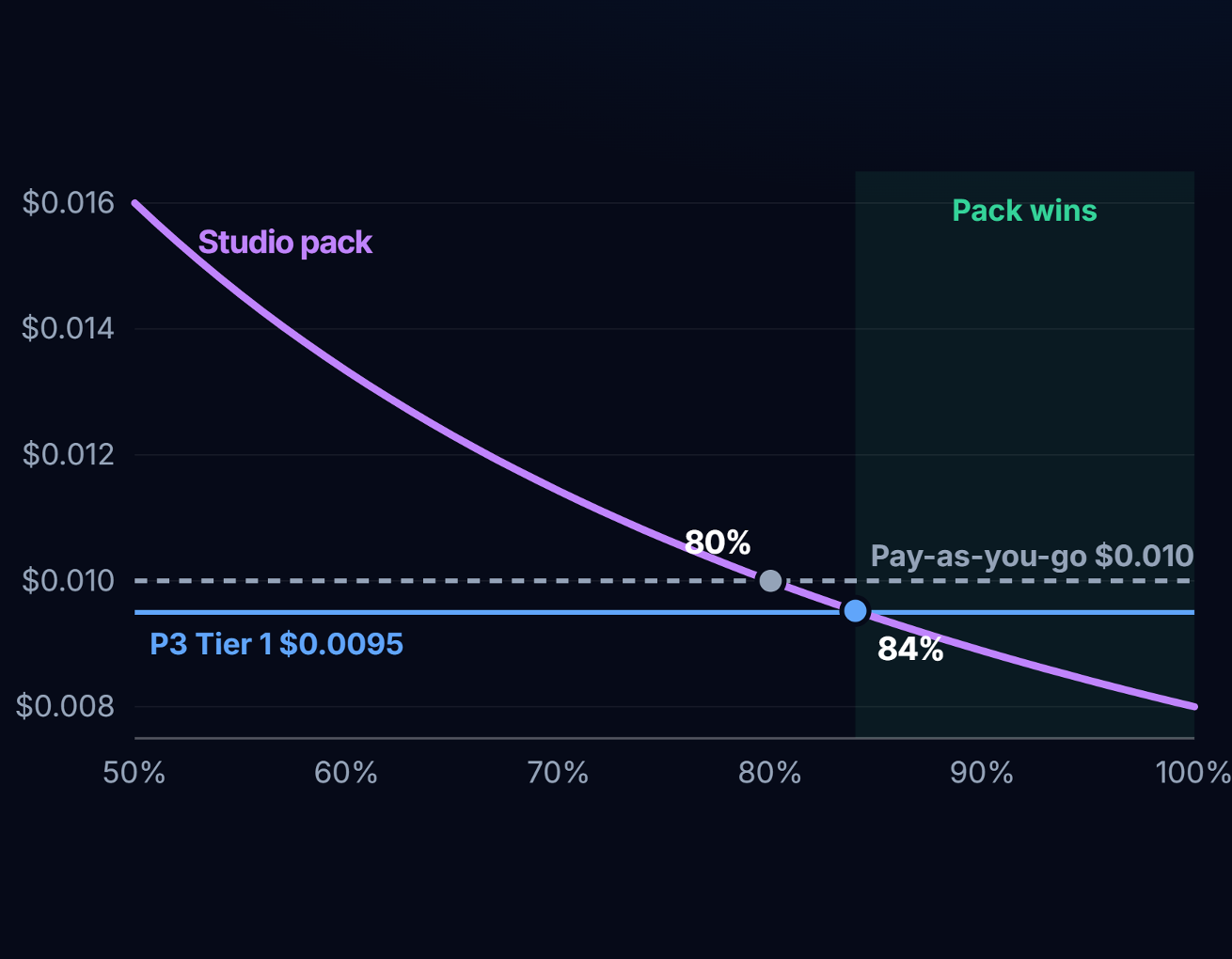
25,000 Copilot Credits for $200/month.
That means the implied list price is:
$200 ÷ 25,000 = $0.008 per Copilot Credit.
So, as a simple illustration:
Monthly usage | Packs required | Monthly list cost |
|---|---|---|
25,000 credits | 1 | $200 |
100,000 credits | 4 | $800 |
500,000 credits | 20 | $4,000 |
1,000,000 credits | 40 | $8,000 |
These calculations use the published $200 / 25,000-credit capacity-pack price. Actual commercial pricing can differ by agreement, market and purchasing channel.
The challenge of this model is that the credits reset every month. When you only spend 20,000 credits per month your price per credit increases, since you did not use every single credit. You back to the list pricing of 0.01 per credit:
$200 ÷ 20,000 = $0.01 per Copilot Credit.
2. Pay-as-you-go
Alternatively, Copilot Studio can be connected to an Azure subscription. Instead of buying capacity up front, Microsoft measures actual Copilot Credit consumption and bills the Azure subscription at the end of the billing period.
PAYG is particularly useful when:
- you're experimenting with agents;
- demand is unpredictable;
- an agent has relatively low usage;
- you don't yet know how much capacity to commit to.
3. Pre-Purchase Plan (P3)
Once consumption becomes more predictable, Microsoft offers the Copilot Credit Pre-Purchase Plan, or P3.
P3 is a one-year, pay-up-front commitment. Instead of paying for every Copilot Credit at PAYG rates, you purchase Copilot Credit Commit Units (CCCUs) at a discounted tier. Copilot Credit consumption automatically draws down from your Azure commitment.
For example, Microsoft provides the following illustration:
Expected consumption: 1,500,000 Copilot Credits
Illustrative PAYG rate: $0.01 per credit
PAYG cost: 1,500,000 × $0.01 = $15,000
Pre-Purchase Plan (P3):
P3 Tier 2: 15,000 CCCUs
Upfront cost: $14,100
Result:
$15,000 PAYG cost → $14,100 P3 cost
Saving: $900, or 6%
Microsoft has published tiering that can provide progressively larger savings as the commitment increases, with its launch material describing discounts of up to 20% at the highest tier.
If you consume the P3 amount before the end of the year, you can purchase another P3 plan or have additional eligible consumption billed through PAYG. If you don't consume the full commitment before the end of the term, the unused balance expires.
The difference between the P3 and the Capacity packs is the term of the credits. With the capacity pack it resets every month, while P3 is an annual pack, which gives you more flexibility against a slightly higher price.
Then things get more interesting: Foundry and GitHub
Not every enterprise agent lives entirely inside Copilot Studio. A development team could build a more custom solution using Microsoft Foundry Agent Service, for example. Microsoft describes Foundry Agent Service as a managed platform for building, deploying and scaling AI agents using supported models and agent frameworks.
Similarly, GitHub has its own commercial and AI consumption.
Historically, this meant organizations could end up managing different consumption models:
Copilot Studio → Copilot Credits
Microsoft Foundry → Azure/Foundry consumption
GitHub → GitHub usage and GitHub AI Credits
That can become difficult when an organization is building agents across several platforms.
GitHub AI Credits
Microsoft also provides a dedicated GitHub AI Credits Pre-Purchase Plan. Here the commercial mechanism is slightly different. You purchase GitHub AI Credit Commit Units, or GHAICCUs. These commit units are then applied against eligible GitHub AI Credit charges.
if GitHub AI generates $100 of eligible retail usage, 100 GitHub AI Credit CUs are consumed.
The plan lasts for one year or until the purchased commit units are exhausted.
Microsoft provides this illustrative example:
expected GitHub AI usage: 2,000,000 AI Credits
hypothetical PAYG rate: $0.01 per credit
equivalent retail consumption: $20,000
hypothetical Tier 1 commitment: 20,000 CUs
hypothetical purchase cost: $19,000
In Microsoft's example, that represents a 5% saving versus PAYG. Microsoft explicitly notes that these figures are hypothetical and actual pricing and thresholds can vary.
GitHub also has a broader Pre-Purchase Plan
This needs to be distinguished from GitHub AI Credits.
The broader GitHub Pre-Purchase Plan can cover usage across products including:
- GitHub Enterprise
- GitHub Copilot
- GitHub Advanced Security
- GitHub Actions
- Codespaces
- Packages
- Large File Storage
GitHub AI Overage Units.
Microsoft's example shows how this can work across an entire GitHub estate.
A hypothetical customer has:
$221,160 GitHub Copilot Business
$141,120 GitHub Enterprise
$136,800 Code Security
$920 AI Credits
Total retail usage: $500,000
Microsoft then illustrates a Tier 3 commitment of 500,000 GitHub Commit Units purchased for $425,000, representing a hypothetical 15% saving. Again, Microsoft labels this example as illustrative rather than actual customer pricing.
Microsoft now introduced a broader Agent/AI commitment Plan
This is where it becomes interesting. All these larger commitments and discounts look great, but there are not many organisations (yet) who have these large spends. The new Flex Plan can cover eligible consumption across:
Foundry, Copilot Studio, Copilot Cowork, Fabric, GitHub
Instead of buying a commitment exclusively for one workload, customers purchase Agent Commit Units (ACUs).
Microsoft again uses monetary consumption as the mechanism.
If Copilot Studio or Foundry generates $100 of eligible retail consumption, 100 ACUs are consumed.
That is an important shift. You're moving from:
"How many credits do I need for this individual technology?"
towards:
"How much eligible AI consumption do I expect across my Microsoft estate?"
The Flex Plan
A Flex Plan is essentially a monetary commitment that can be consumed by the different products covered by that specific Flex offer. Microsoft describes it as a shared monetary balance rather than fixed monthly or hourly
For example:
You purchase a $50,000 Flex Plan
During the term you consume:
Eligible workload | Usage |
|---|---|
Copilot/agent workloads | $18,000 |
Foundry workloads | $14,000 |
GitHub workloads | $10,000 |
Other eligible consumption | $8,000 |
Total | $50,000 |
The important point and the opportunity is that, all these products are covered by the Flex Plan, consumption draws from the same monetary balance. You are now able to make higher commitments which gives you a lower price, per credit.
You don't have to predict perfectly beforehand whether your AI investment is going to land in Foundry, Copilot Studio or GitHub.
A practical calculation
Let's put everything together.
Imagine an organization with 1,000 Microsoft 365 Copilot users. They build three agents.
Agent A: internal HR assistant
Standard harness used in Microsoft 365 only available to Microsoft 365 Copilot licensed users. Most supported use is covered by the users' existing Microsoft 365 Copilot licenses.
Agent B: autonomous finance agent
The agent performs processes independently and generates: 500,000 Copilot Credits per month.
Using the published Copilot Studio capacity pack as a simple list-price comparison:
500,000 ÷ 25,000 = 20 capacity packs
20 × $200 = $4,000/month
Annualized: $4,000 × 12 = $48,000/year.
Agent C: custom Foundry application
Suppose eligible Foundry usage produces: $4,000/month
Annual consumption: $4,000 × 12 = $48,000/year
And suppose GitHub AI/development workloads generate another: $24,000/year
The organization's total incremental AI consumption is therefore approximately:
$48,000 Copilot/agent consumption
$48,000 Foundry
$24,000 GitHub
= $120,000 per year
Instead of thinking about those as three completely separate commitments, you could combine those with the Agent/Flex Plan, make a higher commitment and receive a better price, per credit.
The decision framework
When we help customers model agent costs, I would reduce it to five questions.
1. Who is going to use the agent?
Does the user already have Microsoft 365 Copilot?
2. Where will the agent run?
Inside Microsoft 365, or through an external channel?
3. Which harness and platform are being used?
Standard harness, Microsoft Copilot/GitHub-based harness, Copilot Studio, Foundry, or another architecture?
Microsoft explicitly says the chosen harness influences both capability and billing.
4. What will the agent actually do?
A simple knowledge agent and a reasoning-heavy autonomous agent can have very different consumption characteristics.
5. How predictable is your AI consumption?
That determines whether you should lean toward:
included entitlement → PAYG → product-specific commitment → broader Agent/Flex commitment
rather than automatically buying the largest credit bundle available.